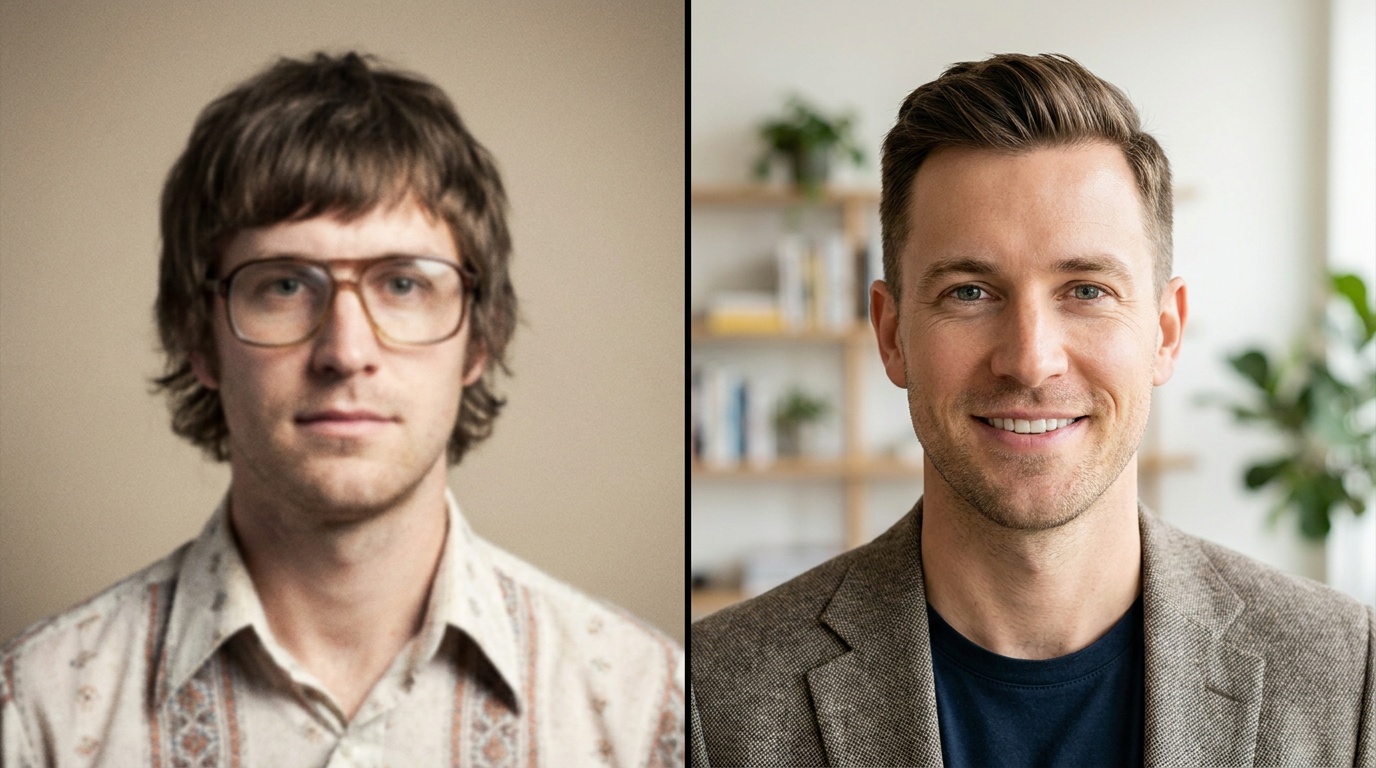
Professional Slack Profile Picture: 5 Places to Use It

You’ve polished your LinkedIn profile and uploaded a stellar headshot, but your work isn’t done. The digital platforms where you build relationships daily—like Slack and Microsoft Teams—are where your image has a constant, subtle impact. A high-quality, professional Slack profile picture isn't just a placeholder; it's a key part of your digital-first personal brand that shapes how colleagues perceive you long before you ever meet in person.
Why Your Internal Profile Picture Matters More Than You Think
In a remote or hybrid work environment, your profile picture is your face. It’s the visual anchor for every message you send, every comment you leave, and every meeting you’re in. A blank avatar or a blurry vacation photo sends a message, whether you intend it to or not. It can suggest disengagement, a lack of attention to detail, or simply that you're a temporary fixture.
Conversely, a strong professional headshot works for you around the clock. It leverages a psychological principle called the Mere-Exposure Effect, where people develop a preference for things simply because they are familiar with them. When colleagues see your friendly, competent face every day, it builds subconscious trust and rapport. For new hires or people in other departments, your profile picture is their very first impression of you.
A great photo humanizes digital communication. It reminds everyone that there's a real person behind the username, fostering a stronger sense of connection and teamwork in a sea of text-based interactions. It signals that you are present, professional, and invested in your role.
The Anatomy of a Perfect Professional Slack Profile Picture
As a photographer, I can tell you that the difference between an amateur snapshot and a compelling portrait lies in the details. A great profile picture for work needs to communicate approachability and competence simultaneously. Here’s how to break it down.
Lighting: The Absolute Non-Negotiable
Bad lighting is the fastest way to ruin a photo. It can create unflattering shadows, wash out your features, or make the image look grainy and unprofessional.
- Avoid: Harsh overhead lighting. This is the classic office ceiling light that creates deep shadows under your eyes, giving you the dreaded "raccoon" look.
- Avoid: Direct, midday sun. It forces you to squint and creates hard, sharp shadows across your face.
- Ideal: Soft, diffused natural light. The best and easiest way to get this is to face a large window on a slightly overcast day. The clouds act as a giant softbox, creating even, flattering light. If it's sunny, find a spot in open shade, like under the overhang of a building, where you're out of direct sun but still illuminated by the bright sky.
If you're shooting indoors without good window light, a simple ring light can work wonders. Position it directly in front of you, slightly above eye level, to fill in shadows.
Composition and Framing
How you frame the shot tells the viewer what to focus on. For a profile picture, the focus should be you.
- Framing: Stick to a classic "head and shoulders" shot. Your face should fill a good portion of the frame without being cut off. No one needs to see your full outfit or the entire room you're in.
- Headroom: Leave a small amount of space above your head. Too much makes you look small and lost in the frame; too little feels cramped and claustrophobic.
- Camera Angle: The most universally flattering angle is to have the camera lens positioned at or slightly above your eye level. This forces you to look up slightly, which defines the jawline and is more engaging. Avoid the low-angle shot from a laptop camera—it's an unflattering view up your nose.
Expression and Pose: Approachable Competence
Your expression is your primary tool for communication in a photo. You want to look like someone people want to work with.
- The Smile: Avoid a huge, toothy grin that can feel forced. Aim for a warm, genuine, and slight smile. This is often called a "smize" (smiling with your eyes). Think of a recent success at work or a funny moment with a friend right before the photo is taken to bring out a natural expression.
- The Pose: Don't face the camera straight-on like it's a passport photo. Angle your body about 45 degrees away from the camera, then turn your head back towards the lens. This simple twist creates depth and is far more dynamic and flattering than a flat, two-dimensional pose.
Wardrobe and Background
Your clothing and background support the main subject: you. They should complement, not distract.
- Clothing: Solid colors are your best friend. Jewel tones like emerald green, sapphire blue, and deep red are flattering on most skin tones. Avoid busy patterns, stripes, large logos, and neon colors that can distract the eye. Choose a neckline that you feel comfortable in, like a crew neck or a simple collared shirt. The goal is to match or be slightly more formal than your company's daily dress code.
- Background: Simplicity is key. A clean, solid-colored wall is a perfect, distraction-free option. If you're in an office or home, make sure the background is tidy and out of focus. A shallow depth of field (a blurred background) is excellent for making you pop. Avoid cluttered bookshelves, messy kitchens, or recognizable vacation spots.
From Selfie to Studio: Getting the Shot Without a Photographer
Not everyone has the budget or time for a professional photography session, especially just for internal tools. The good news is, you can get a fantastic result yourself.
The DIY Method: A Step-by-Step Guide
- Find Your Light: Position yourself facing a window with soft, indirect light.
- Set the Scene: Choose a simple, uncluttered background.
- Use the Right Camera: Use the back camera on your smartphone—it's much higher quality than the front-facing selfie camera.
- Stabilize Your Phone: Prop your phone up on a stack of books or use a small tripod. This prevents camera shake and frees up your hands.
- Use the Timer: Set your phone’s camera timer to 3 or 10 seconds. This gives you time to get into position and adopt a natural expression without the awkwardness of holding the phone.
- Take Dozens of Shots: Professional photographers take hundreds of photos to get one perfect one. Take way more than you think you need. Experiment with slight variations in your smile and head angle. You can review them later and pick the best one.
The AI-Powered Alternative
If you’ve taken a good selfie but the background isn’t right, or you wish the lighting were more polished, AI tools can bridge the gap. Services like Portretto allow you to upload a few of your best well-lit selfies and transform them into a variety of studio-quality headshots. It can generate options with different professional outfits, perfect studio lighting, and clean backgrounds, giving you the polish of a corporate shoot from the comfort of your home. This is an incredibly efficient way to get a versatile set of professional images.
Upload a photo, pick a look and get your portrait in a minute. Your face stays yours.
Try itBeyond Slack: 4 More Places Your Professional Headshot Shines
Your professional image extends far beyond a single chat app. Consistency is key to building a strong personal brand. Here are four other essential places to deploy your new headshot.
1. Microsoft Teams & Google Workspace
These platforms are the digital headquarters for millions. Just like with Slack, your photo in Teams, Google Chat, and Gmail is your corporate identity. Using the same professional photo across all these platforms creates a cohesive and reliable presence. When a colleague emails you and then messages you on Teams, the consistent image reinforces recognition and familiarity.
2. Project Management Tools (Asana, Jira, Trello)
In tools like Asana, Jira, or Trello, tasks are often represented by a small circular icon of the assignee. Without a photo, you are a grey initial. With a photo, you are a person. It adds a human touch to workflows and accountability. It’s a small detail that makes team collaboration feel more personal and less transactional, especially in large or distributed teams.
3. Your Email Signature
This is a powerful and often-overlooked opportunity, especially for anyone in a client-facing or external communication role. Adding a small, high-quality headshot to your email signature in Gmail or Outlook puts a face to your name for vendors, clients, and partners. It makes your emails stand out, builds rapport before you ever speak, and makes you more memorable. Keep the image file size small to avoid clogging up inboxes.
4. Your Personal Website or Online Portfolio
For freelancers, consultants, creatives, or anyone showcasing their work online, a professional headshot is non-negotiable. It's often the centerpiece of an "About Me" page, which is typically one of the most visited pages on a personal site. Your photo is the first step in convincing a potential client or employer that you are a credible and trustworthy professional they should hire.
Tailoring Your Headshot for Different Contexts
Should you use the exact same photo everywhere? For internal tools like Slack and Teams, consistency is generally best. However, having a small, curated set of headshots allows you to tailor your image to the platform's context while remaining recognizable.
For example, the headshots you can generate with an AI photo studio often come in different styles. You could use:
- The Corporate Standard: A shot with a blazer and a neutral studio background for LinkedIn and your corporate bio.
- The Approachable Professional: A shot with a smart blouse or button-down shirt and a slightly warmer, softer background for Slack, Teams, and your email signature.
- The Creative Professional: A shot in black and white or with a more environmental (but still clean) background for your personal portfolio or a professional Twitter profile.
The key is that your face, expression, and the overall quality remain consistent. You should be instantly recognizable across all platforms, creating a unified and intentional professional brand.
Ultimately, investing a small amount of time into your professional profile picture is one of the highest-leverage activities you can do for your career in a digital world. It’s a detail that works for you every single day, building trust, connection, and a brand of quiet competence.
FAQ
What makes a good professional Slack photo?
A good professional Slack photo features clear, soft lighting with your face as the focus. It should be a head-and-shoulders shot against a simple, non-distracting background. Your expression should be approachable and competent, like a gentle, confident smile.
Should my Slack picture be the same as my LinkedIn?
It can be, and consistency is good for branding. However, you can use a slightly more relaxed but still professional version for Slack to match the conversational tone of the platform. For example, a shot without a blazer might feel more appropriate for daily chat than your formal LinkedIn portrait.
Is it unprofessional to not have a profile picture on Slack?
While not a fireable offense, having no picture (a default avatar) can make you seem disengaged or anonymous, especially in a remote setting. It creates a small barrier to connection and makes it harder for new colleagues to put a face to your name, hindering rapport-building.
How can I get a professional headshot without a photographer?
You can take a great DIY headshot using your smartphone. Find a spot with soft natural light, use a simple background, and set a timer to take the photo. For a more polished look, you can use an AI photo service like Portretto to transform your best selfies into studio-quality portraits with professional lighting and backgrounds.