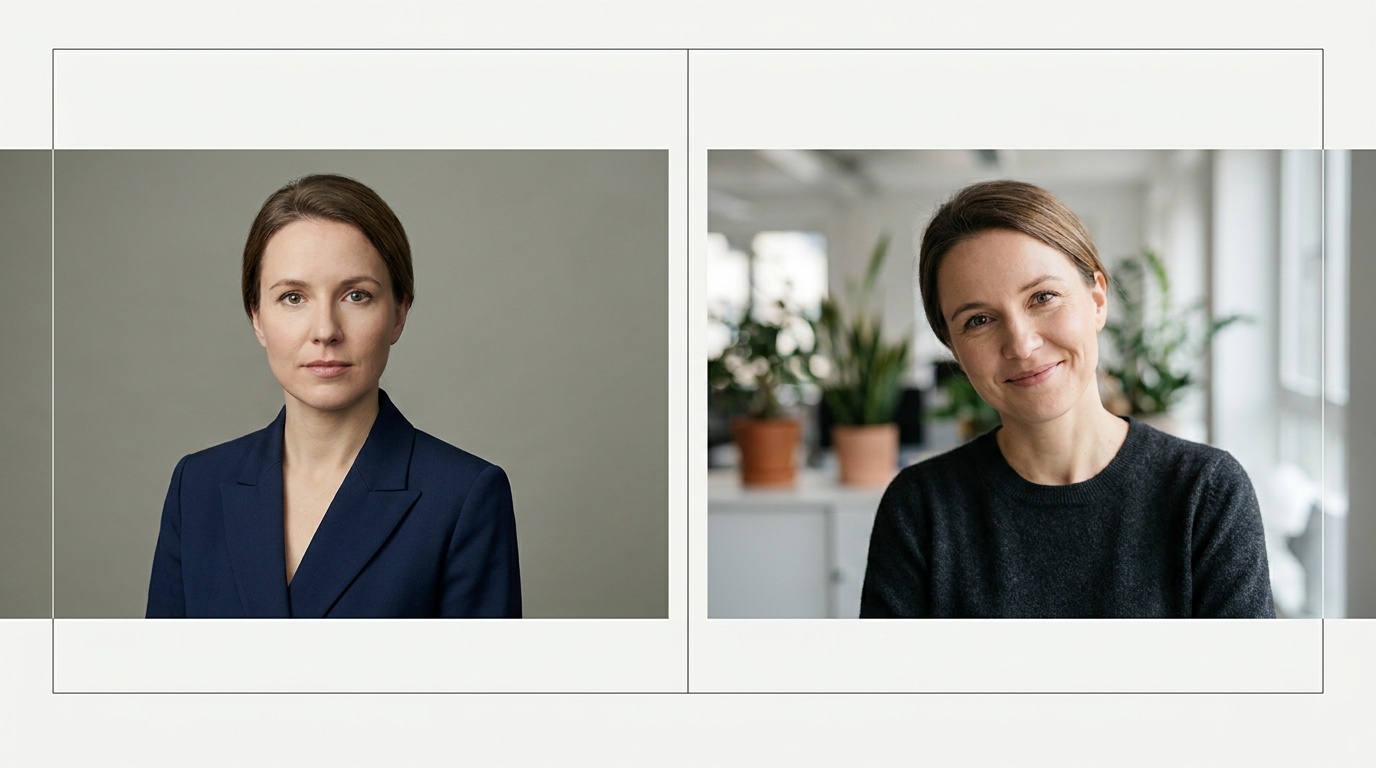
Consistent Personal Brand Photos with AI: A Guide

Your professional identity lives in more places than just your LinkedIn profile. It’s on your speaker bio for that upcoming conference, your avatar in a client's Slack channel, and your byline on a guest post. Using consistent personal brand photos ai technology can generate is the key to presenting a unified, trustworthy image everywhere you appear online, ensuring you look polished and professional across the board.
Why Visual Consistency Is Your Secret Weapon
Think about any major brand. You immediately associate Coca-Cola with a specific shade of red and Apple with clean, minimalist design. This is no accident. Visual consistency builds recognition and, more importantly, trust. When what we see aligns with what we expect, our brains feel comfortable. The same principle applies directly to your personal brand.
When a potential client sees your sharp, corporate headshot on LinkedIn and then finds a blurry, decade-old vacation photo on your personal website, it creates a disconnect. It feels disjointed and unprofessional. Who is the real expert here? This inconsistency can subtly erode the trust you’re working so hard to build.
In my work as a portrait photographer, clients would book multi-hour sessions specifically to capture a variety of looks—different outfits, lighting, and expressions—to use across platforms. This was the only way to achieve true consistency. It was effective, but also expensive and time-consuming. Today, technology offers a more accessible path to that same polished result.
The Anatomy of a Cohesive Photo Set
A cohesive set of brand photos isn’t just a collection of pictures you like. It’s a curated selection where every image feels like it belongs to the same family. As a photographer, I look for five key elements that tie a professional shoot together. You should look for the same things in your own brand photos.
Lighting
Lighting does more than just illuminate you; it sets the mood. Consistent lighting is the single most important factor for a cohesive photo set. Decide on a style and stick with it.
- Soft, Diffused Light: This is the most popular style for professional portraits. It’s flattering, friendly, and approachable. It mimics the light from a large, overcast window or a photographer's softbox. There are no harsh shadows on the face.
- Hard, Dramatic Light: This creates strong contrast with deep shadows and bright highlights. It can feel edgy, powerful, and artistic. Think of the portraits in magazines like Wired or Fast Company. It's a bold choice that needs to match your brand's personality.
Color Palette
The colors in your photos—both your clothing and your background—should align with your brand's palette. A wellness coach might use earthy tones, muted greens, and soft creams. A financial consultant might opt for classic navy, grey, and white. These colors reinforce your brand message subconsciously.
Posing and Expression
Are you the friendly, smiling expert or the serious, thoughtful visionary? Your expressions should vary, but the overall emotional tone should be consistent. A good set might include:
- A warm, genuine smile (for social media avatars).
- A confident, gentle smile (for LinkedIn).
- A thoughtful, engaged look, slightly off-camera (for an “About Me” page).
All these expressions can fit within a brand that is “approachable and intelligent.” The key is that you don’t have one photo where you’re laughing hysterically and another where you look stern and unapproachable.
Wardrobe
Your clothing speaks volumes. For a cohesive set, the style of your wardrobe should be consistent, even if the outfits change. If your brand is built on corporate authority, your photos should feature business suits, blazers, and sharp button-downs. If you're a creative, your wardrobe might be more expressive and casual, but it should still feel curated and intentional, not like you just threw on a random t-shirt.
Background
Simple is almost always better. A busy, distracting background pulls focus away from you. Consistent backgrounds tie your photos together. This could be a solid neutral color (grey, beige, off-white), a subtle texture like a brick wall, or a clean, out-of-focus office setting. The background should be the stage, not the star of the show.
How to Create Consistent Personal Brand Photos with AI
Now for the practical part. Armed with the knowledge of what makes a photo set cohesive, you can strategically use AI to build your own. It's a four-step process.
Step 1: Define Your Brand's Visual Identity
Before you upload a single photo, you need a plan. Don't let the technology lead you; you must lead the technology. Answer these questions to create a creative brief for yourself.
- My Brand Keywords: List 3-5 words that describe my brand (e.g., “innovative,” “trustworthy,” “calm,” “energetic”).
- My Target Audience: Who am I trying to connect with?
- My Desired Mood: How do I want people to feel when they see my photo? (e.g., “inspired,” “reassured,” “impressed”).
- My Color Palette: What 2-3 colors represent my brand?
- My Core Style: Is my brand formal, smart casual, creative, or minimalist?
This simple exercise will be your North Star, guiding every choice you make in the AI generation process.
Step 2: The Perfect Source Photo: Garbage In, Garbage Out
This is the most critical step for getting realistic, high-quality results. The AI builds everything from the data you provide it. A low-quality source photo will produce low-quality, uncanny, or distorted results. Period.
Checklist for Your Source Selfie:
- Resolution: Use the highest-quality camera you have (your smartphone's rear camera is often better than the front one). The image must be sharp and in focus.
- Lighting: Face a large window during the day. You want soft, even light across your entire face. Avoid direct sunlight, overhead kitchen lights, or having a window behind you.
- Expression: A neutral expression or a very subtle, closed-mouth smile is best. Let the AI generate the bigger smiles and more specific expressions later.
- Angle: Look directly into the camera lens. Hold the phone at eye level. No high angles looking down or low angles looking up.
- Obstructions: No sunglasses, hats, headphones, or hands touching your face. Push your hair back so your entire face shape is visible.
- Background: Stand in front of a plain, neutral-colored wall.
Step 3: Generating Your Photo Sets
Now you’re ready to use an AI tool. With a service like Portretto, you upload your carefully selected selfies and then choose from different style packs. This is where your brand identity plan from Step 1 comes into play.
The AI generates brand-new images, placing your face into different scenarios with professional lighting, backgrounds, and clothing. The magic is that because it’s all based on the same source photos, your facial structure, features, and identity remain perfectly consistent. You can generate a “Studio Headshot” pack for your corporate needs and a “Black & White” pack for a more artistic feel. Because they originate from the same source and a high-quality AI, they will look like they were taken by the same photographer in a single session.
Step 4: Curating Your Final Selection
The AI will give you dozens of options. Your job is to be the creative director. Go back to your brand identity plan and select the 3-5 “hero images” that best represent you. Look for the ones where the lighting is perfect, the expression matches your desired mood, and your face looks the most like you on your best day. Discard any that feel slightly “off” or don't align with your brand.
Upload a photo, pick a look and get your portrait in a minute. Your face stays yours.
Try itDeploying Your New Brand Photos: A Platform-by-Platform Guide
Once you have your curated set of cohesive photos, you can deploy them strategically.
- LinkedIn: Use your most professional, classic headshot. Typically shoulders-up, looking at the camera, with a gentle, confident smile and a simple background. This is your digital handshake.
- Twitter/X & Threads: These platforms are faster-paced. You can use a photo with a bit more personality—perhaps a more expressive smile or a slightly more dynamic pose. The avatar is small, so it must be a clear shot of your face.
- Personal Website/Portfolio: Use a variety here. The homepage banner might feature your “hero” shot. The About Me page can use a warmer, more approachable portrait. The contact page could use one where you are looking directly at the camera to create a connection.
- Speaker Bios & Guest Posts: Match the photo to the context. For a tech conference, use a modern, confident shot. For a wellness podcast, use a softer, more open expression. Your cohesive set gives you these options without looking inconsistent.
- Email Signature & Slack/Discord: Use a clear, friendly, and easily recognizable headshot. This is a high-frequency touchpoint, and consistency here reinforces your identity in every single interaction.
Common Mistakes to Avoid (And How to Fix Them)
As with any new technology, there are pitfalls. Here are the most common mistakes I see people make when creating AI-generated brand photos.
- The “Style Buffet” Mistake: The AI offers countless fun styles—fantasy, sci-fi, vintage. It's tempting to use them all. But using a futuristic cyborg avatar on X and a formal business portrait on LinkedIn creates brand chaos. Fix: Stick to the brand identity plan you created. Choose 2-3 styles that are closely related and fit your professional goals.
- Ignoring Platform Context: Using a beautiful, wide, full-body shot for a tiny circular profile picture. When shrunk down, your face will be an unrecognizable dot. Fix: Crop your chosen images for their final destination. Most platforms require a square or circle, so make sure your face is centered and clear.
- The Uncanny Valley: Choosing AI results that don't quite look like you. Maybe the eyes are a little off, or the skin is too smooth. This makes people feel uneasy. Fix: Be ruthless in your curation. Only use photos that are 99-100% believable and look just like you. The goal is a better photo, not a different person. Prioritizing a good source photo is the best prevention here.
- Forgetting to Refresh: Using the same headshot for ten years. Your personal brand should evolve with you. Fix: Plan to refresh your brand photos every 1-2 years, or after any significant change in your appearance. AI makes this so affordable and fast that there's no excuse for an outdated photo.
Building a powerful personal brand requires intention. By strategically using AI to generate a set of consistent, high-quality portraits, you can present a polished, professional, and trustworthy image on every platform. You are no longer limited by the time and expense of traditional photoshoots; the tools to build a world-class visual brand are right at your fingertips.
FAQ
Can I use different photos on different social media platforms?
Yes, you should use different photos, but they must be from the same cohesive set. For example, use a formal headshot on LinkedIn and a more relaxed, smiling one on Twitter. Because they share the same lighting, style, and quality, they will reinforce your brand instead of fragmenting it.
How often should I update my personal brand photos?
A good rule of thumb is to update your professional photos every 1-2 years, or whenever you have a significant change in your appearance (like a new hairstyle or glasses). Regular updates keep your brand looking current and relevant.
Are AI-generated headshots professional enough for LinkedIn?
Absolutely, provided you use a high-quality service and provide a great source photo. Modern AI tools can produce results that are indistinguishable from professional studio photography, with realistic lighting and sharp detail. The key is to choose business-oriented styles and avoid anything overly artistic or fake-looking.
What's the difference between a filter and an AI portrait?
A filter simply lays a color or texture effect over your existing photo. An AI portrait service, like Portretto, generates a completely new image. It uses your facial data but rebuilds the lighting, clothing, background, and pose from scratch to create a brand new, studio-quality photograph.
How can I make sure my AI photos actually look like me?
The most important factor is providing a high-resolution, well-lit source photo where your face is clear. Secondly, choose an AI service that prioritizes realism. When curating your results, be critical and only select the images that are a true and accurate representation of you.