What to Wear for AI Headshots: A Photographer's Guide
As a portrait photographer, I’ve spent countless hours advising clients on their wardrobe choices. Now, with the rise of AI-powered studios, the question has shifted slightly, but its importance hasn't faded. Knowing what to wear for AI headshots is the secret to transforming a simple selfie into a stunning, professional portrait, because the AI needs the right information to do its best work.
Why Your Selfie's Wardrobe Is Crucial for AI Portraits
It’s a common misconception that you can upload any old photo and the AI will simply paint a new outfit over you. That's not how it works. Think of the AI as a hyper-intelligent digital sculptor. Your selfie is its block of marble. The AI analyzes the pixels of your original photo—the colors, textures, shadows, and shapes—to understand your form and build the new portrait around it.
The clothing in your source photo provides the foundational data. The AI uses the neckline, the fit on your shoulders, and the color of your top as a starting point. If you give it messy, confusing data (like a bulky hoodie or a busy pattern), the AI struggles. This can lead to strange digital artifacts, unnatural draping, or an output that looks nothing like the polished headshot you envisioned.
Conversely, a clean, simple outfit in your selfie gives the AI a perfect canvas. It provides clear information about your form, allowing the generator to seamlessly create a sharp blazer, a classic sweater, or whatever style you choose, all while keeping the focus on your face.
The Golden Rules of Clothing for AI-Generated Headshots
After running hundreds of my own photos through various generators, I’ve landed on a few non-negotiable rules for the source photo. Follow these, and you'll be 90% of the way to a perfect result.
Rule 1: Prioritize the Neckline
This is, without a doubt, the most important factor. The area around your neck and shoulders is the bridge between your face (which the AI preserves) and the new outfit it's creating. A clean, simple neckline is essential.
Excellent Neckline Choices:
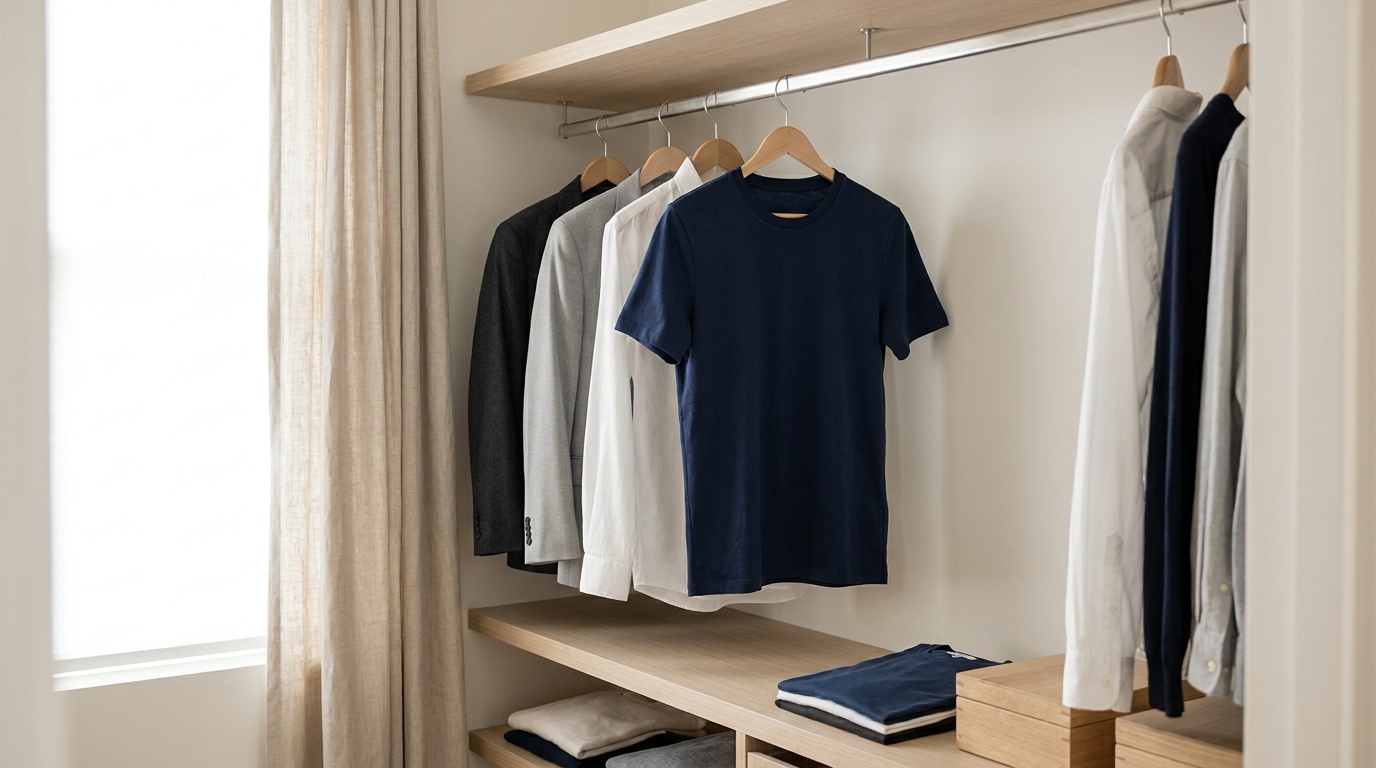
- Crew Neck: The absolute champion. A simple, round-necked t-shirt provides a clean, unbroken line for the AI to work with. It's the safest, most reliable option.
- Simple V-Neck: Also a great choice, as long as it isn't too deep. It creates a nice leading line and works well for generating both professional and casual tops.
- Collared Shirt: A classic button-up shirt is fantastic if you're aiming for a corporate look. The AI can easily use the existing collar as a perfect guide for building a blazer or suit jacket around it.
Necklines to Avoid at All Costs:
- Turtlenecks/Cowl Necks: These cover the neck and jawline, confusing the AI about where your head ends and your torso begins. This often results in bizarre, distorted collars.
- Hoodies: The hood creates a lumpy, irregular shape behind your head and on your shoulders that the AI cannot interpret correctly. It's the number one cause of warped collars and misshapen shoulders in AI headshots.
- Strapless or Spaghetti Strap Tops: These provide no information about your shoulders or where clothing should naturally sit. The AI is forced to guess, often resulting in unnaturally broad shoulders or clothes that look painted on.
- Asymmetrical or Complex Necklines: Anything with cutouts, intricate straps, or an uneven shape will likely be misinterpreted and lead to strange digital artifacts.
Rule 2: Stick to Solid Colors
As a photographer, I always advise clients to lean towards solid colors because they keep the focus on the person, not the outfit. For AI, this advice is even more critical.
Busy patterns, like florals, paisley, or complex geometrics, are a nightmare for AI. The algorithm tries to replicate the pattern within the new garment it's creating, but it almost always results in a distorted, smudged, or warped texture. Stripes and checks can become wavy and uneven.
Best Color Choices:
- Neutral Tones: You can't go wrong with charcoal, navy blue, medium grey, or even black (as long as the lighting is good). These colors are professional and provide excellent contrast.
- Deep Jewel Tones: Rich colors like emerald green, sapphire blue, ruby red, or deep purple look fantastic on camera and translate well for AI. They add a pop of personality without being distracting.
Colors and Patterns to Avoid:
- Busy Patterns & Prints: As mentioned, these will distort.
- Large Logos, Graphics, or Text: These will become a blurry, unrecognizable mess.
- Neon Colors: Bright, fluorescent colors can create “color bleed” in the photo, casting an unnatural hue on your skin that the AI will bake into the final image.
- Colors Matching Your Skin Tone: A beige, cream, or tan top can make it hard for the AI to distinguish the edge of your face and neck from your clothing, potentially softening important details.
Rule 3: Focus on a Clean Fit
The AI needs to understand your body shape. The fit of your top in the selfie helps it do that.
Avoid wearing anything extremely baggy or oversized. The AI won't know where your actual shoulders and torso are, leading to a poorly structured final image where a generated blazer might look shapeless and ill-fitting. On the other end, super-tight clothing can create small wrinkles or tension lines that the AI might misinterpret or exaggerate.
The sweet spot is a simple, well-fitting top. It doesn’t have to be tailored, just a standard t-shirt or blouse that sits naturally on your frame.
What to Wear for AI Headshots: A Style-by-Style Guide
Your choice of clothing in the source photo should also be influenced by the style of headshot you want to create. Here’s how to match your selfie wardrobe to your desired outcome.
For a Corporate or Business Headshot
Your Goal: To generate a portrait where you're wearing a sharp blazer, suit, or professional blouse.
What to Wear in Your Selfie:
- Option A (Best): A simple, solid-colored crew neck t-shirt. A dark color like navy or charcoal is ideal. This gives the AI a blank slate to build a blazer upon, ensuring the collar and lapels look crisp and natural.
- Option B (Excellent): A classic button-down collared shirt. The AI can use the visible collar as a perfect template, making the final image look incredibly realistic, as if you were wearing a suit all along.
Common Mistake: Wearing a casual V-neck. While okay, it can sometimes lead to the AI creating a blazer with a very deep V-cut, which might not be the professional look you're going for.
For a Creative or Casual Portrait
Your Goal: To create a more relaxed portrait, perhaps in a sweater, denim jacket, or simple, stylish top.
What to Wear in Your Selfie: A solid-colored crew neck or scoop neck top is perfect. The simplicity allows the AI to generate a wide variety of textures, from a cozy knit sweater to a leather jacket, without conflicting data. A simple denim or chambray shirt can also work well as a base for this style.
Common Mistake: Wearing something too formal in your source photo, like a stiff collared shirt, and then asking the AI to create a very casual look. The AI might struggle to reconcile the formal base with the casual request.
For a Dramatic or Editorial Look
Your Goal: To achieve a high-impact look, like a moody black and white photo or a sophisticated magazine-style portrait.
What to Wear in Your Selfie: For these styles, a solid-colored top is still best, but you can introduce a subtle texture. A simple knit sweater, a thick-weave cotton shirt, or a ribbed top can add a layer of depth. The AI can pick up on this texture and use it to enhance the play of light and shadow, which is key for dramatic portraits. Avoid anything shiny or reflective.
Upload a photo, pick a look and get your portrait in a minute. Your face stays yours.
Try itYour Selfie Checklist: Nailing the Source Photo
Getting the perfect AI headshot is about more than just your clothes. The entire source photo matters. Before you snap your selfie, run through this checklist I use for my own test shots.
Clothing & Wardrobe
- [ ] Simple, solid-colored top.
- [ ] Clean neckline (crew neck is best).
- [ ] No distracting patterns, logos, or text.
- [ ] No forbidden items: hoodies, turtlenecks, strapless tops, or complex collars.
- [ ] Good fit—not too baggy, not too tight.
Lighting & Background
- [ ] Lighting: Face a large window for soft, flattering, natural light. This is the single best lighting setup for any portrait.
- [ ] Background: Stand in front of a plain, neutral wall (grey, white, or beige). Remove any clutter, frames, or distracting objects from the shot.
- [ ] Avoid: Harsh overhead lighting (causes unflattering shadows), backlighting (puts your face in shadow), or mixed, chaotic lighting.
Camera & Pose
- [ ] Angle: Hold your phone at eye level. Photos from too high or too low distort your features.
- Distance: Don't be too close or too far. Your head and shoulders should fill most of the frame.
- Expression: A neutral expression or a slight, gentle smile works best. Avoid exaggerated expressions.
- Gaze: Look directly into the camera lens, not at your own image on the screen.
- Hair: Style your hair as you'd want it in the final portrait. Make sure it's not obscuring your eyes or face.
Common Wardrobe Mistakes and How the AI Sees Them
To really drive the point home, let's look at what happens when you choose the wrong outfit. These are real-world examples from my own experiments.
- The Mistake: Wearing a Hoodie.
- What You See: A comfortable, casual top.
- What the AI Sees: A confusing, lumpy mass of fabric behind your neck.
- The Unfortunate Result: The AI tries to turn the hood into a blazer collar, resulting in warped, oversized lapels. Or, you get strange bumps on the shoulders of your generated suit jacket. It never looks right.
- The Mistake: A Bold Patterned Shirt.
- What You See: Your favorite floral blouse.
- What the AI Sees: A complex map of colors and shapes to replicate.
- The Unfortunate Result: The floral pattern gets stretched and smeared across the new AI-generated outfit, creating a blurry, artifact-filled texture that looks like a glitch.
- The Mistake: A Strapless Top.
- What You See: A simple top that shows off your shoulders.
- What the AI Sees: A floating head with no shoulder or clothing data.
- The Unfortunate Result: The AI has to invent your shoulders and the fit of the clothing from scratch. This can lead to an uncanny valley effect with unnatural proportions. While a sophisticated tool like Portretto has algorithms trained to handle this better than most, you are always better off providing clear, unambiguous information to the AI.
- The Mistake: A Low-Contrast Outfit.
- What You See: A cream-colored shirt against an off-white wall.
- What the AI Sees: Difficulty finding the edge between your shoulder and the background.
- The Unfortunate Result: The edges of your portrait are soft and blurry. The final headshot lacks the crisp, professional quality you want, as your outline seems to bleed into the background.
By understanding how the AI “thinks,” you can make smart choices that set you up for success. The formula is simple: provide the AI with clean, clear, and simple data. A solid-colored crew neck shirt, good lighting, and a plain background are the ingredients for a flawless AI headshot every time.
FAQ
What is the best shirt to wear for an AI headshot?
The ideal shirt is a simple, well-fitting crew neck t-shirt in a solid, neutral color like charcoal grey, navy blue, or black. A classic button-down shirt also works exceptionally well, especially if you plan to generate a professional portrait with a blazer.
Should I wear jewelry in my selfie for an AI portrait?
It's best to keep jewelry minimal or remove it entirely. Small, simple stud earrings are usually fine, but avoid statement necklaces, large hoops, or dangly earrings. These can confuse the AI, causing them to become distorted or unnaturally merged with your skin or clothing.
Can I wear my glasses for an AI headshot?
Yes, absolutely, especially if you wear them daily. The key is to avoid glare on the lenses. Take your photo facing a soft light source, like a window, rather than having a bright light in front of you that will reflect in the glass. Most modern AI generators handle glasses quite well.
Does the color of my shirt in the source photo matter?
Yes, the color is very important. Choose a solid color that contrasts well with your skin tone and your background. Avoid neon colors, which can cast an odd hue, or colors that are too similar to your skin, as this can confuse the AI.
Can the AI change my hair in a headshot?
Most high-quality AI headshot services, including Portretto, are designed to preserve your unique facial features, including your hairstyle, to ensure the portrait is authentically you. The AI might clean up a few stray hairs, but it will not change your haircut or color. Style your hair exactly as you want it to appear in the final portrait.